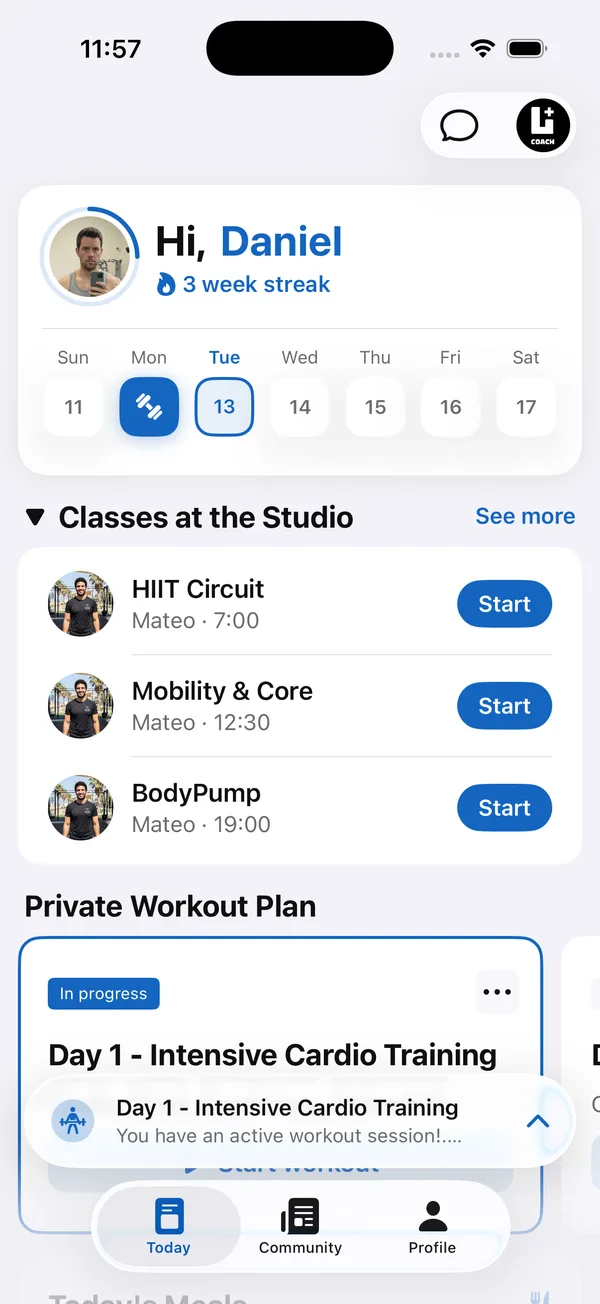
Personal trainer client management software, usually a coach dashboard plus a client app, replaces the mix of spreadsheets, notes, WhatsApp threads and photo folders most trainers start with. Instead of hunting through five places to answer “how is this client doing?”, you open one profile.
This guide covers what a client management system for personal trainers should include, how to compare options without relying on feature lists, and how to move your clients in without losing a week.
What is a personal trainer client management app?
It’s software with two sides: a coach dashboard where you manage clients, programs and communication, and a client app where clients see their plan, log workouts and check in. What clients do in their app shows up on your side, so you don’t have to collect it by hand.
That’s the main difference from general tools. A spreadsheet or a notes app stores what you type. A client management app collects what your clients do.
What should a client management system for personal trainers include?
A client management system for personal trainers should cover the full client cycle, from sign-up to progress review. The core features:
- Client list with status. New sign-ups, active clients and past clients separated, with search.
- One profile per client. Program, completed workouts, measurements, check-ins, meal plan and private notes in one place.
- Program assignment. Assign a plan from your library and adjust it for one client without changing the original.
- Client-side logging. Sets, reps and weight logged from the phone during the workout.
- Check-ins. Progress photos, weight and measurements that arrive on the profile with a date.
- Messaging. A chat per client, opened from the profile, so context is never far away.
- Activity overview. A quick way to see who trained this week and who went quiet.
- Optional extras. Scheduling, nutrition, selling programs and team access, depending on how you work.
How do you choose personal trainer software for client management?
Choose personal trainer software for client management by testing it against your real week, not by counting features. Five steps:
- 1Write down your weekly workflowList what you do every week: programs, check-in reviews, messages, bookings. Every option must handle these well before extras matter.
- 2Test the client app yourselfLog a full workout on your own phone as a client would. If it’s awkward for you, clients will stop logging.
- 3Check the pricing modelSome tools charge per client, others a fixed price per plan. Work out the monthly cost at your current client count and at double it.
- 4Check language and brandingIf your clients use another language, such as Hebrew, check the client app supports it. Decide whether clients should see your brand or the software’s.
- 5Run a trial with real clientsMove two or three clients in for one training block and run both systems side by side before switching everyone.
How much does personal trainer client management software cost?
The cost depends more on the pricing model than on the headline price. Some tools charge per active client, so the bill rises with every sign-up. Others sell fixed plans with a client limit, so the price only changes when you move up a plan. Work out the monthly cost at your current client count and at double it, and check whether the client app is included or sold as an add-on.
Coach+ uses fixed plans: $39 a month for up to 10 clients, $89 for up to 45 and $199 for up to 150. Every plan includes the Lyft+ Coach app for iOS and Android and a branded web app for your clients, and starts with a 30-day free trial with no credit card. For prices across other apps, see best software for personal trainers and what it costs
Is there a free client management app for personal trainers?
Free options exist, but free usually means limits on clients or features, or a spreadsheet you maintain by hand. For a few in-person clients, that can be enough. Once clients train without you and you review their logs remotely, compare the paid price with the admin hours you spend each week. Most paid apps offer a free trial, which is the fairest way to compare.
How to move your clients into a new app in one week
- 1Day 1: Set up your accountAdd your branding, profile and the language your clients use.
- 2Day 2: Rebuild your main programsStart with the two or three plans most clients follow. The rest can wait.
- 3Day 3: Invite a first groupSend the invite to a few engaged clients and help them install the app.
- 4Day 4–5: Assign and add notesAssign programs and copy key notes (injuries, goals, preferences) into each profile.
- 5Day 6–7: Review and invite the restCheck the first logs and check-ins, fix anything confusing, then invite everyone else.
Which app helps personal trainers track clients?
The app that helps personal trainers track clients best is one where clients enter the data themselves: workouts logged set by set, weekly check-ins with photos, and food logs. You then read progress on one profile instead of asking for updates. Look for these views:
- Training log. Every completed workout with sets, reps and weight, so you can see if loads are going up.
- Check-in history. Weight and progress photos by date, to compare week to week.
- Nutrition log. What the client actually ate, next to the meal plan you set.
- Activity. Who trained this week and who went quiet, without opening every profile.
A sales CRM tracks leads and follow-ups, not training. The difference is explained here: CRM for personal trainers
How Coach+ handles client management
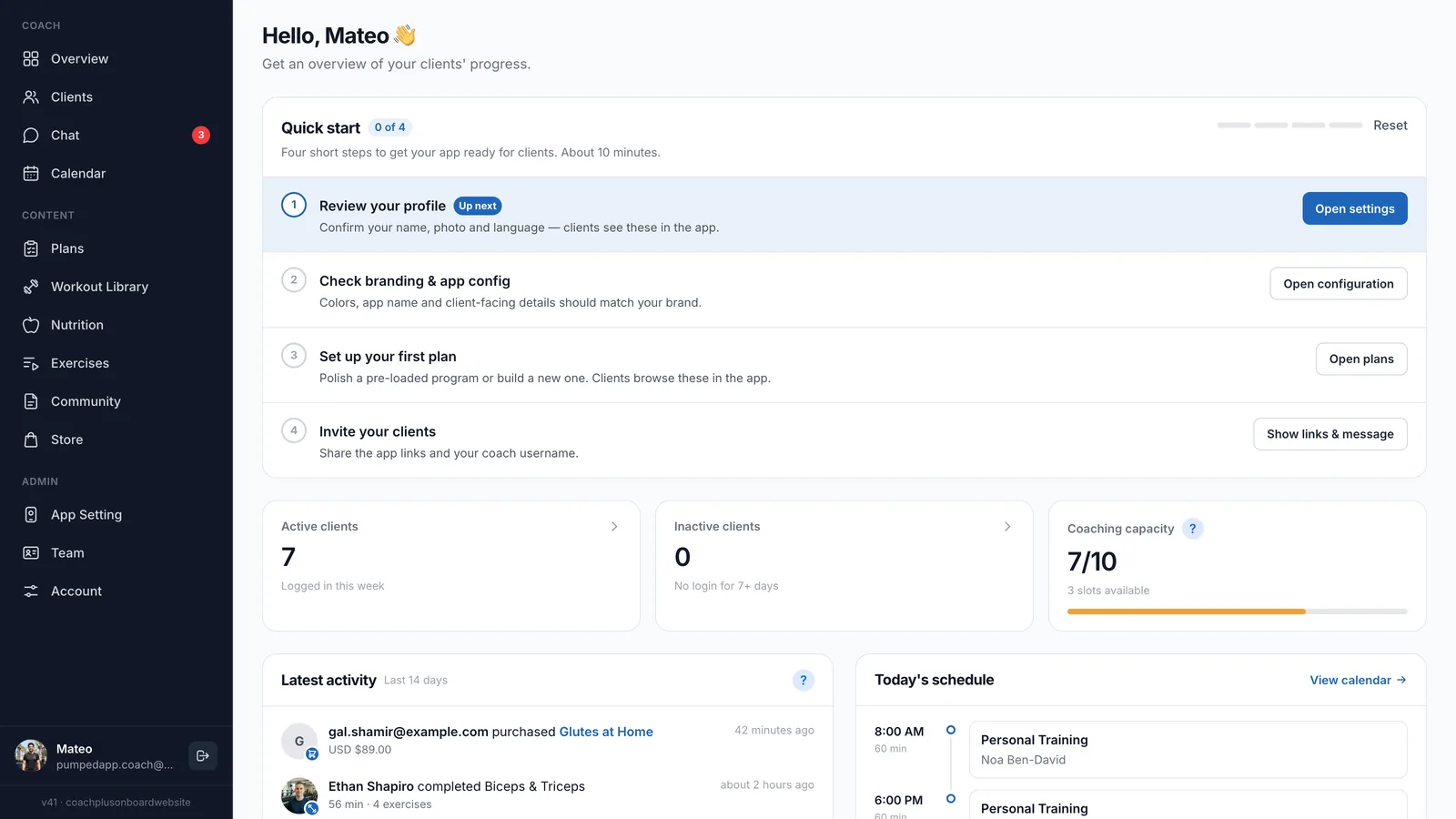
On the Coach+ coaching platform, you manage clients from the coach dashboard, and every client gets your own branded app, connected to it, in English or Hebrew.
- A Clients page with Coached, Leads and All tabs, search, and a coaching capacity meter. Leads don’t use a slot until you start coaching them.
- Client profiles with Overview, Measurements, Training Volume, Check-in, Program, Meal Plan and Profile tabs, plus private notes only you can see.
- Completed workouts from the last 12 months with every set, rep and weight, and training volume per muscle group.
- An AI workout analyzer that reviews a client’s logged workouts and gives one recommendation you apply with one tap.
- A Message button on each profile that opens your chat with that client.
- Calendar bookings and Team roles for coaches and admins, depending on your plan.