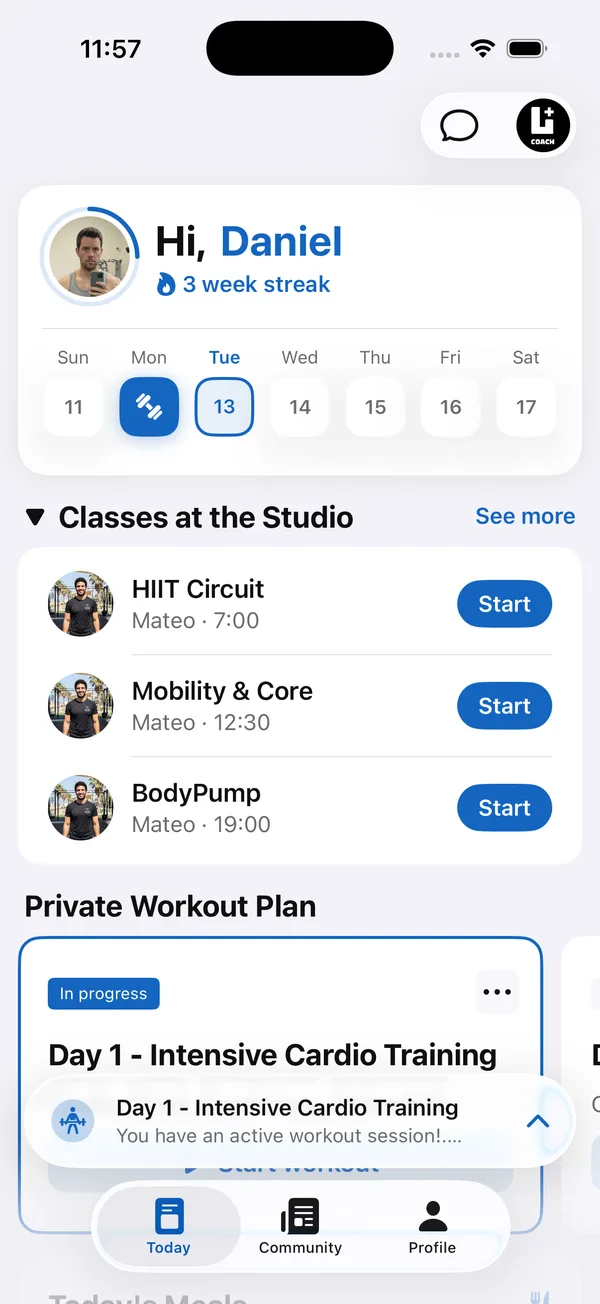
Choosing a gym management app is harder than it looks, because the phrase covers two very different jobs. One job is running the business: who paid, who can walk through the door, who booked the 7am class. The other is the training itself: what each member does today, whether they did it, and how they’re progressing.
This guide separates the two, explains what each one should do for a small gym or studio, and gives you a checklist, the questions to ask vendors, and a plan for rolling a new app out to members.
What does a gym management app actually do?
A gym management app does one or both of two jobs: it runs the business side of the gym, and it runs the training and member experience. Vendors use the same words for both, so it helps to name them before you compare anything.
- Business and operations systems. Memberships, recurring billing, door access, class booking and check-in at the front desk, and point of sale for drinks or merchandise. This is what most people mean by gym management software.
- The training and member experience layer. Programs, workout logging, progress tracking, nutrition, messaging between coaches and members, a community feed, and a member app that carries the gym’s own brand.
Some products try to do everything. Others go deep on one layer. Neither approach is wrong, but knowing which layer a product is built around tells you where it will be strong and where it will feel thin.
What should gym management software for small gyms handle on the business side?
On the business side, gym management software for small gyms should make sure every member is paying for the right plan and can get in to train without friction at the front desk.
- Memberships and plans. Monthly, punch cards, trials, freezes and family plans, with clear start and end dates.
- Billing. Recurring charges, failed payment follow-up, and the receipts or invoices your accountant needs.
- Door access and check-in. Who can enter and when, and a record of visits.
- Class booking. Timetables, capacity, waitlists and cancellation rules.
- Point of sale. Selling a shake, a towel or a personal training package at the desk.
- Reports. Revenue, active members and members who stopped coming.
What does a gym app for members need on the training side?
A gym app for members needs to give each person a clear plan for today and give coaches a way to see what actually happened. This is the layer members open every day, so it shapes how they feel about the gym more than any billing screen.
- Programs. Workouts written by your coaches, with exercises, sets and notes, not a PDF.
- Workout logging. Members record weights and reps set by set, so the next session builds on the last.
- Progress and check-ins. Weight, measurements and progress photos that coaches can review.
- Nutrition. Meal plans for members who want more than training.
- Messaging. A private chat between each member and their coach, instead of personal WhatsApp numbers.
- Community. A shared feed where members see each other train.
- Your brand. A white label gym app shows your gym’s name, logo and colors, not the software company’s.
Do you need one system or two?
It depends on who writes the training. If members mostly come to classes and train on their own, a strong business system may be all you need. If your coaches write programs, follow up on progress and talk to members between sessions, you need a real training layer too, and a business system with a basic workout feature may not be enough.
Many gyms end up with two tools: one for memberships and payments, one for training. That works well when each tool has a clear job. The cost is a little admin, such as making sure a new member is added in both, so ask early how members will move between the two.
How do you choose fitness studio management software?
Start from what breaks first in your gym today, not from the longest feature list. Then check each option against this list:
What questions should you ask a gym software vendor?
Ask questions that reveal how the product works day to day, not just what it can do on a demo.
- Which part of my gym is your product built for? A vendor that answers “everything” should be able to show both layers in depth.
- Whose name do members see? Your gym’s, or the vendor’s. Ask to see the member app on a phone.
- How is pricing counted? Per member, per coach, per location or a flat fee, and what changes as you grow.
- Who can change what? Can you give coaches full access to members without access to billing and settings?
- How does data leave? If you switch, what can you export, and in what form?
- How do you handle members’ personal data? In Israel, Amendment 13 to the Privacy Protection Law took effect on 14 August 2025, according to law firm Pearl Cohen, and it treats technology service providers that process data for a business as “database holders” with obligations of their own. Ask where data is stored and who at the vendor can see it.
- What does support look like? Hours, language, and how fast someone answers when the front desk is stuck.
How do you roll out a new gym app to members?
Get the coaches on board first, set the app up before anyone sees it, help members install it in person, and pick one date after which training only comes through the app.
- 1Start with the coachesAgree on how workouts are written and where members log them. If coaches don’t use it, members won’t either.
- 2Set it up before launchAdd your branding, build the workouts you run every week and fill in this week’s schedule, so the app is useful on day one.
- 3Install it in personHelp members download the app at the front desk or after class. A link in a group chat gets ignored; two minutes at the desk does not.
- 4Pick one switch-over dateAnnounce that from a set date, programs and the schedule only come through the app. Running the old channels for months keeps the old habits alive.
- 5Give members a reason to open itPost in the community feed, send a challenge workout, and reply to the first workouts members log.
Where Coach+ fits in a gym
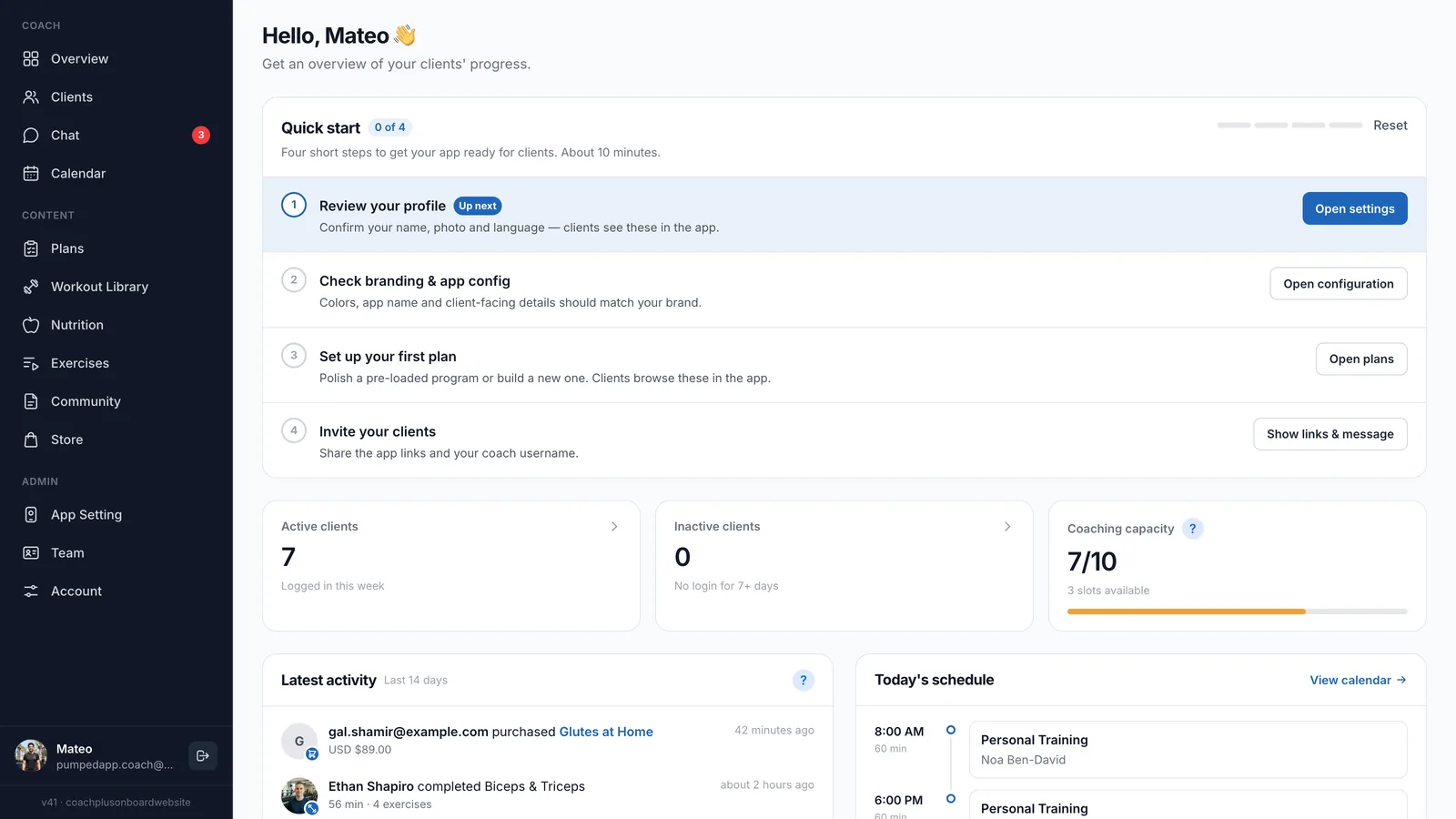
Coach+ is the second kind of software: the training and member experience layer. The Coach+ coaching platform gives your team one coach dashboard and gives every member your gym’s own branded app, on iPhone and Android, connected to it. It is not a door-access, membership-billing or point-of-sale system, so gyms often use it alongside the booking and billing system they already have.
- Your app’s name, colors, icon and launch image, set by an Admin.
- A Team page with Coach and Admin roles. Coaches work with members, programs and chat; only Admins change app settings and billing.
- One Workout Library shared by the whole team, and, depending on your plan, a Schedule tab for the studio’s week.
- Programs members log set by set, check-ins with progress photos and weight, and a private chat with each member.
- A community feed where members’ finished workouts are posted automatically.
- A Store for selling your workout plans, with orders and sales numbers in the dashboard.
- Members join by downloading your app and entering your coach username, then appear as leads until a coach starts coaching them.