An app for personal trainers to track clients only works if clients actually log in it, and that logging does more for consistency than any motivation post. Most coaches have tried the other way: a Sunday motivation post, a quote in the stories, a "let’s go team" in the group chat. The likes come in. The week’s training looks exactly the same.
Motivation is a mood. Consistency is a habit, and habits are built from small actions that repeat. For coaching clients, the most useful small action is logging every workout. This guide covers why tracking matters, how to get clients to actually log, what the app needs to do, and what to do with the data.
Why should personal trainers track client workouts?
Tracking improves adherence because it turns a plan into a record that both client and coach can see, and that record shows progress and drop-off early.
- It turns a plan into a record. A program says what to do. A log shows what actually happened, and that’s the only thing you can coach.
- It makes progress visible. Clients forget they squatted 60 kg two months ago. The log reminds them, and seeing their own numbers move is more convincing than any quote.
- It gives you something specific to say. "Great job" is easy to scroll past. "You added 5 kg to your row this week" shows someone is paying attention.
- It shows drop-off early. A client who stops logging is usually about to stop training. You see it within days, not at the end of the month.
How do you get clients to log their workouts?
Make logging take seconds: pre-fill the program in an app so clients only confirm weight and reps during the workout. Clients rarely skip logging because they’re lazy. They skip it because it’s slow. If they have to open a notes app, remember the exercise name and type everything from scratch, it lasts two weeks.
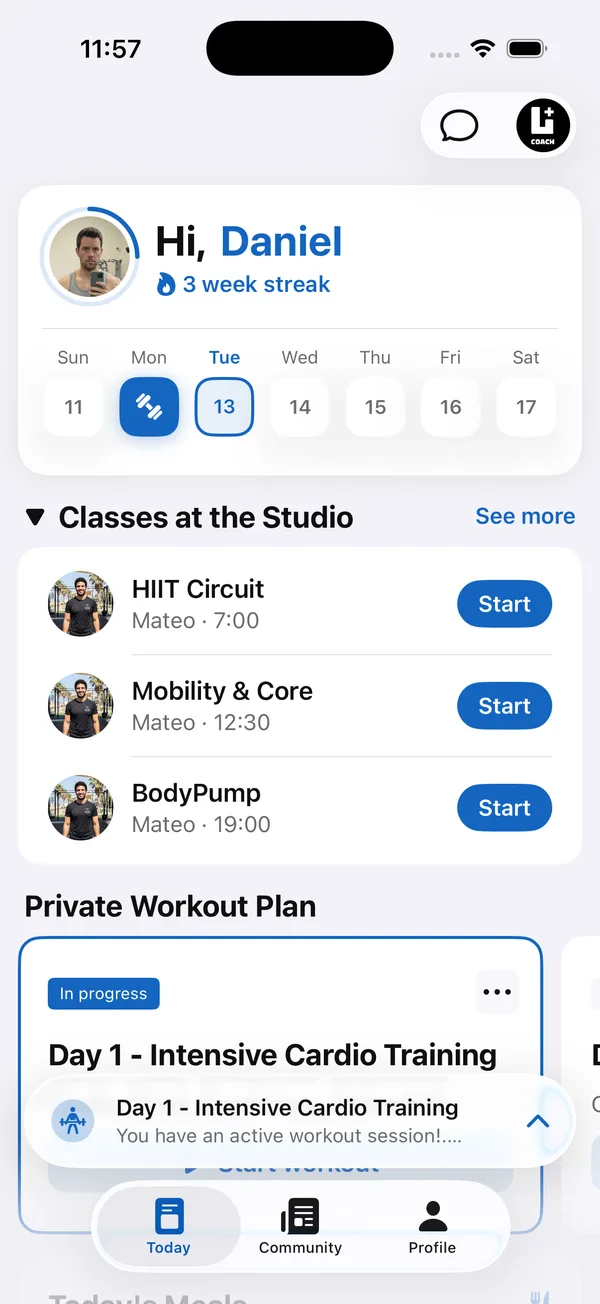
- Pre-fill the program. Every exercise, set and target is already there. The client only confirms or adjusts the weight and reps.
- Log during the workout. Logging after the session means guessing. Logging in the rest between sets takes no extra time.
- Keep it in one place. If the program is in a PDF and the log is in a spreadsheet, neither one gets used.
- Put coaching notes on the exercise. A cue like "pause at the bottom" right next to the sets saves a message and keeps technique on track.
What is the best app for personal trainers to track clients?
The best app for personal trainers to track clients is the one clients keep logging in, where the coach sees every log without asking for it. A long feature list matters less than these five things:
- Programs arrive pre-filled. Clients confirm weight and reps instead of typing exercises from scratch.
- Logs reach the coach automatically. No screenshots and no copying numbers from messages into a sheet.
- A full history for each client. Every set, rep and weight, plus a longer view of training volume, so progress is judged over months.
- A view of who went quiet. Active and inactive clients at a glance, so the weekly review starts in the right place.
- Notes and chat next to the training. Cues on the exercise and conversations in the same app keep the coaching tied to the numbers.
How do you set a logging standard with new clients?
Set it in the first two weeks: explain why the log matters, ask for every set, reply to the early logs and progress the program from them.
- 1Explain why you need the logTell new clients you adjust their program from their numbers. If it isn’t logged, you’re guessing.
- 2Ask for every set, including bad daysA short session with lower weights is still useful data. Clients who only log the good days give you a false picture.
- 3Respond to the first logsIn the first two weeks, comment on every logged workout. Clients keep doing what gets noticed.
- 4Progress the program from the logWhen a client hits the top of the rep range, raise the weight. Clients who see their log change their program keep logging.
What should coaches do with client workout logs each week?
Use them in a fixed weekly review. Sort clients by their last activity and start with anyone who hasn’t trained in seven days or more. A short, personal message to each of them does more than a group post to everyone.
Then look at the clients who are training. Check whether their volume per muscle group is rising over a month or two, not week to week. Flat for six weeks usually means the program needs a change, not more motivation.
Do motivation posts help client consistency?
Only when they show real training, not quotes. A client who sees three others finish their leg workout this morning has a concrete reason to do theirs. That’s proof that people in the same program are showing up. Keep the shared feed for finished workouts and real wins, and keep the coaching in the logs.
How do personal trainers track client progress beyond the workout log?
Add a weekly check-in and, for clients with a nutrition goal, a food log. The workout log shows what a client lifted. It does not show body weight, how they slept, how the week felt or what they ate, and those answers explain most stalled progress.
- Weekly check-ins. The same short questions every week plus progress photos, so you compare like with like over months.
- Nutrition tracking. Clients log meals by barcode, photo or search, and you see it next to their training instead of in a separate app.
- One client profile. Workouts, check-ins, photos and food in one place, so a review takes minutes instead of opening four apps.
For the questions to ask each week, see the guide to client check-ins for personal trainers
Is there a free app for personal trainers to track clients?
Some apps have free tiers, but they usually limit the number of clients or leave out the client app, which is the part that gets workouts logged. Before choosing, check three things: how many clients the free plan allows, whether clients get their own app to log in, and what it costs once you grow past the limit.
Coach+ is not free, but every plan starts with a 30-day free trial with no credit card, and paid plans start at $39 a month for up to 10 clients. That is enough time to run a full month of logging with real clients before paying. See the Coach+ client tracker
What should an app for personal trainers to track clients include?
It should include workout logging, weekly check-ins with progress photos, nutrition tracking and messaging, all feeding one coach dashboard. Use this checklist when comparing apps:
For the options side by side with prices, see the guide to the best software for personal trainers
How Coach+ helps personal trainers track clients
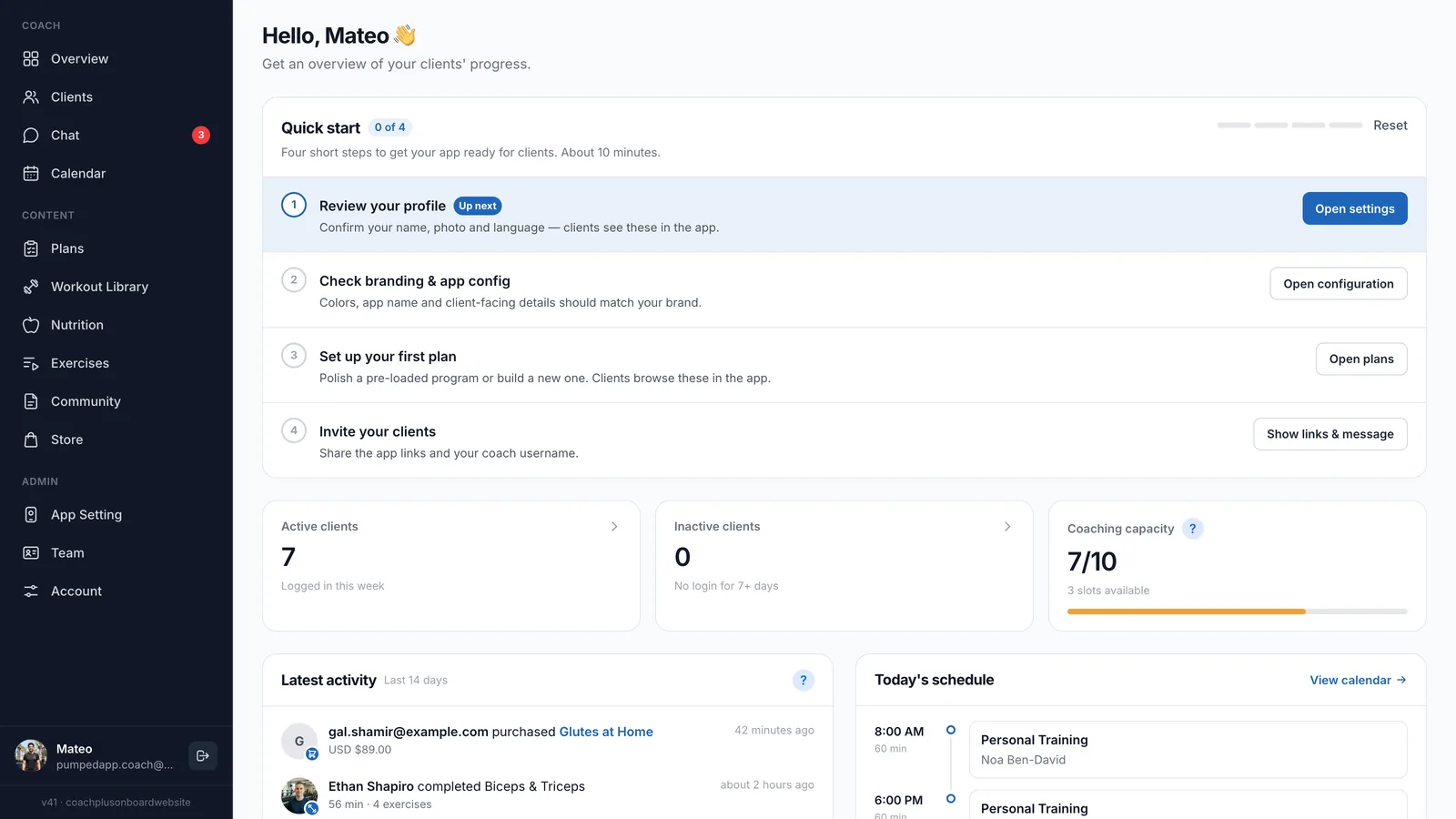
The Coach+ coaching platform connects your coach dashboard to the branded app every client gets from you. You and your clients each have your own app, everything lives in one platform, and every set a client logs lands on your side.
- Programs clients log set by set, with your coach notes on each exercise.
- Each client’s completed workouts with every set, rep and weight, and training volume per muscle group over 30 days, 90 days or 6 months.
- An Overview showing active and inactive clients, based on who opened the app in the last 7 days, plus their latest activity.
- A community feed where finished workouts are posted automatically, and chat with each client.
- Weekly check-ins with progress photos, and a nutrition tracker where clients log meals by barcode, photo or search.
- An AI workout analyzer that reviews a client’s logged workouts and gives one recommendation you apply with one tap.